> ## Documentation Index
> Fetch the complete documentation index at: https://docs.xano.com/llms.txt
> Use this file to discover all available pages before exploring further.
# Understanding enforce_hidden_fields for Add, Edit, and Add/Edit Record
export const BrowserFrame = props => {
const {url = "xano.run", maxWidth = 820, className = "", lightSrc, darkSrc, alt = "", children} = props || ({});
const style = typeof maxWidth === "number" ? {
maxWidth: `${maxWidth}px`,
margin: "16px 0"
} : {
maxWidth,
margin: "16px 0"
};
const hasSwapImages = Boolean(lightSrc && darkSrc);
return
{hasSwapImages ? <>


: children}
;
};
# The Issue
If you have an input or variable in your logic that shares the name of a database column you're targeting with Add Record, Edit Record, or Add/Edit Record, that column's data can be overwritten, even if it's hidden in the function.
* This behavior is triggered any time XanoScript is saved, either via the UI editor, Agent Mode, or pushing changes via the CLI and Metadata API.
* The XanoScript code shows no change before and after, and the issue is invisible in both version history and Run & Debug.
# Previous Workarounds
* Show/hide the field in the visual UI, and re-save, which fixes it temporarily until the XanoScript is saved again.
* Renaming the inputs or variables to not match a column name
* Using the Patch Record function instead
# Who's impacted?
You may be affected if an existing function was originally built visually, later edited in XanoScript or with AI, and includes an input or variable whose name matches a column used by an Add, Edit, or Add/Edit Record statement.
Functions created entirely in XanoScript are generally not affected.
# What's the fix?
For functions impacted by this that you aren't already addressing in other ways, you can use the new **Enforce Hidden Fields** option. This can be enabled by either checking the box in the function panel, or by adding `enforce_hidden_fields = true` to the function's XanoScript, and saving your changes.
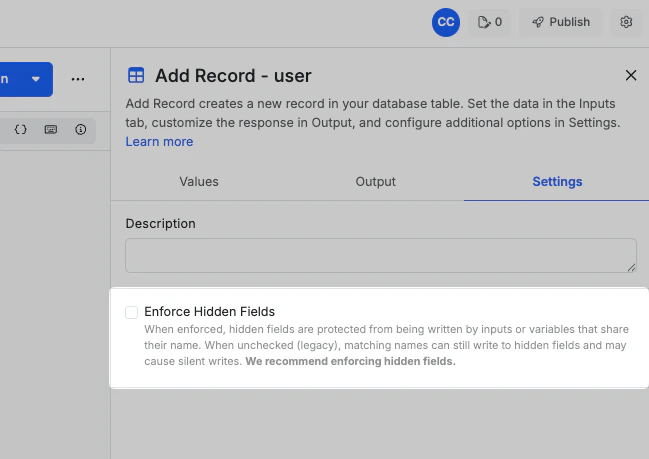 ```java theme={null}
db.add user {
enforce_hidden_fields = false
data = {...
```
This fix is designed to preserve compatibility, meaning that existing statements retain the old behavior until changed, and new statements default to the new `enforce_hidden_fields` behavior.
Please note that after applying **enforce\_hidden\_fields**, when you save your changes, this line of code will **disappear**. Do not be alarmed; this is expected behavior and the new behavior is still applied.
# Example Behaviors
## Impacted functions
Using these example inputs:
Running an Add Record statement on a table with `name` and `email` fields, and hiding the `email` field in the function, with the goal of that value not being written, `email` will be overwritten with whatever value is supplied in the `email` input.
## Impacted functions after enabling `enforce_hidden_fields`
Using these example inputs:
Running an Add Record statement on a table with `name` and `email` fields, and hiding the `email` field in the function, with the goal of that value not being written, `email` will be written with the default value specified in the table, with no value, or with a null value if the field is nullable.
```java theme={null}
db.add user {
enforce_hidden_fields = false
data = {...
```
This fix is designed to preserve compatibility, meaning that existing statements retain the old behavior until changed, and new statements default to the new `enforce_hidden_fields` behavior.
Please note that after applying **enforce\_hidden\_fields**, when you save your changes, this line of code will **disappear**. Do not be alarmed; this is expected behavior and the new behavior is still applied.
# Example Behaviors
## Impacted functions
Using these example inputs:
Running an Add Record statement on a table with `name` and `email` fields, and hiding the `email` field in the function, with the goal of that value not being written, `email` will be overwritten with whatever value is supplied in the `email` input.
## Impacted functions after enabling `enforce_hidden_fields`
Using these example inputs:
Running an Add Record statement on a table with `name` and `email` fields, and hiding the `email` field in the function, with the goal of that value not being written, `email` will be written with the default value specified in the table, with no value, or with a null value if the field is nullable.