> ## Documentation Index
> Fetch the complete documentation index at: https://docs.xano.com/llms.txt
> Use this file to discover all available pages before exploring further.
# RBAC (Role-based Access Control)
RBAC is available with Pro and Custom plans. On a different plan and want access? [Contact sales](https://xano.com/sales) to upgrade.
Role-based Access Control allows you to build custom user roles and assign granular workspace-level permissions for your team members. Use Xano's RBAC feature to ensure team members only have access to and can only take action on the things that should be available to them.
Define custom roles with the right level of access for each kind of team member.
Apply a role when inviting a user, or adjust per-workspace permissions later.
Copy/paste permissions between users and apply roles or changes to many at once.
What each permission unlocks across the instance, workspace, and tenant center.
## Accessing RBAC
From the [instance selection screen](https://app.xano.com/instance), click the icon and choose Permissions (RBAC).
## The Permissions Center
Xano offers five pre-defined user roles as described in the table below.
| Role | Intended use | Access summary | Key limitations |
| ------------- | ------------------------------------------------------------------------------------------------------- | ------------------------------------------------------------------------------------------------------------------------------------------------------------------------------------------------------------------------------------------------------------ | ---------------------------------------------------------------------------------------------------------------------------------------------------------------------- |
| **Admin** | Full administrative access across the instance, workspace, releases, tenant center, and tenant cluster. | Full access to workspace resources, release management, tenant center, backups, secrets, tenant cluster, RBAC, logs, deploy, impersonation, metadata API, exports, run/debug, and marketplace/connect features. | None in the predefined matrix. |
| **Developer** | Build and manage workspace functionality without full tenant/security administration. | Full access to most workspace resources, including database, content, APIs, functions, tasks, services, middleware, files, logs, settings, release, tenant center, backups, deploy, impersonation, metadata API, marketplace/connect, export, and run/debug. | Cannot manage Tenant Center RBAC, Tenant Center Secrets, Tenant Cluster, Tenant Cluster Secrets, or debug from request history. |
| **Readonly** | Review configuration, data, logs, and release/tenant information without making changes. | Read access to most workspace resources, release, tenant center, and tenant center logs. | Cannot create, edit, export, run/debug, use marketplace/connect, manage RBAC, deploy, impersonate, access secrets, backups, metadata API, or tenant cluster resources. |
| **Billing** | Limited access for billing or account-level visibility. | Read access to the instance workspace only. | No access to workspace resources, releases, tenant center, tenant cluster, logs, exports, run/debug, or feature actions. |
| **Suspended** | Temporarily or permanently block a user's access. | No access. | All permissions are disabled. |
### Creating roles
Before inviting team members to your instance, make sure the proper roles are ready to use.
In the **Roles** tab, click Add new custom role
Give the new role a name, and click Add Custom Role
You'll see your new role appear in the list of roles below the Xano defined options.
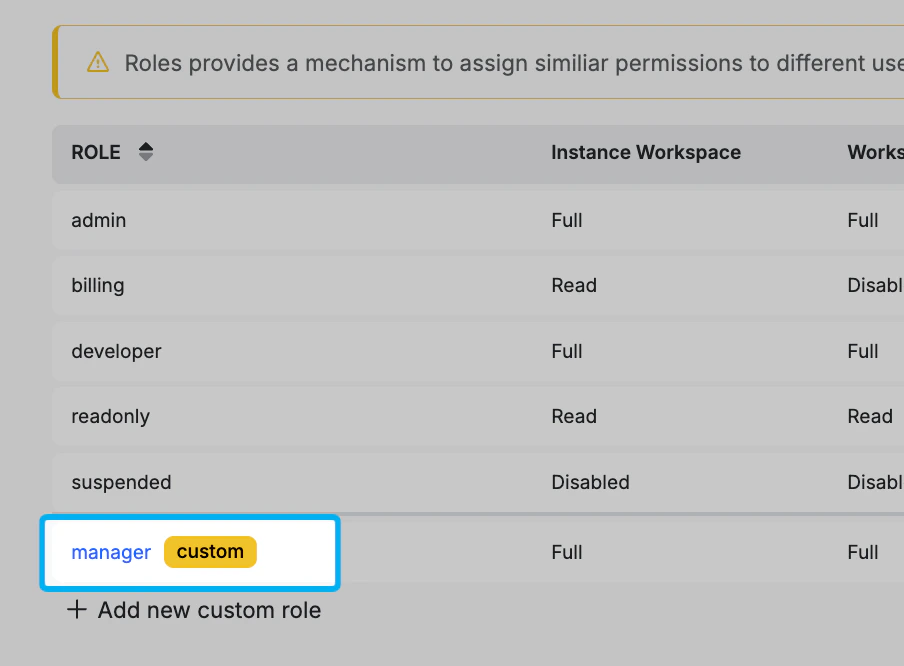 A new role comes with all permissions enabled by default.
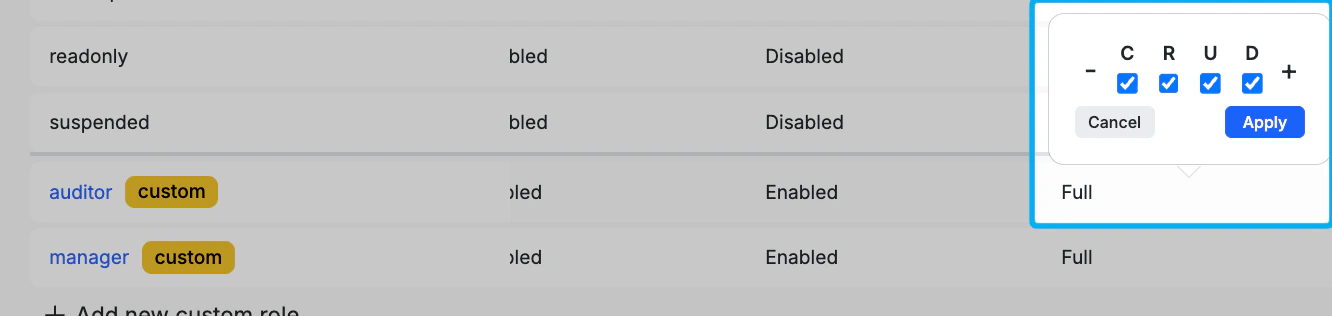
Click on a permission to adjust it for that role. There are four levels of access for each permission: **Create (C)**, **Read (R)**, **Update (U)**, and **Delete (D)**. Some, depending on context of the permission, will only offer **Enabled** or **Disabled**. There are also **-** and **+** options to quickly add or remove all permissions for that feature.
A new role comes with all permissions enabled by default.
Click on a permission to adjust it for that role. There are four levels of access for each permission: **Create (C)**, **Read (R)**, **Update (U)**, and **Delete (D)**. Some, depending on context of the permission, will only offer **Enabled** or **Disabled**. There are also **-** and **+** options to quickly add or remove all permissions for that feature.
 Active users inside the Instance won't be immediately impacted by changes to permissions. They will have to leave the Instance and re-enter for changes to take effect.
### Assigning roles
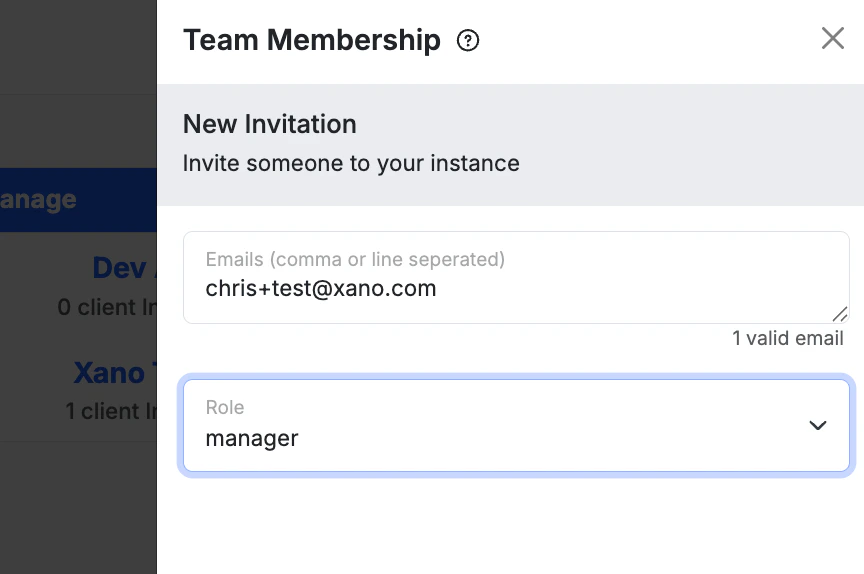
You can assign a role to a user when inviting them to your instance.
Active users inside the Instance won't be immediately impacted by changes to permissions. They will have to leave the Instance and re-enter for changes to take effect.
### Assigning roles
You can assign a role to a user when inviting them to your instance.
 If they are already a member of your instance, you'll see them listed under each workspace in the **Workspace** tab of the Permissions Center, and you can granularly adjust their permissions for each workspace.
You can also filter the Workspace tab by team member and workspace to focus on one person's access across the instance, or to see who has access to a specific workspace.
To change a user's role after they've already been invited, click the next to your instance on the instance selection screen and choose **Manage Team**.
### Adjusting permissions
Click on a permission to adjust it for that user. There are four levels of access for each permission: **Create (C)**, **Read (R)**, **Update (U)**, and **Delete (D)**. Some, depending on context of the permission, will only offer **Enabled** or **Disabled**. There are also **-** and **+** options to quickly add or remove all permissions for that feature — turning everything on is sometimes referred to as **Full** access.
When adjusting permissions for a user on a specific workspace, you'll also see an **Inherit** option, which means that permission will obey what's defined by the assigned role.
**Inherit example:** If you set Jane's Run & Debug permission on Workspace A to **Inherit**, and Jane's assigned role is **Developer**, then Jane's Run & Debug access on Workspace A will match whatever the Developer role allows for Run & Debug. Change the role later and Jane's inherited permissions follow automatically.
### Bulk operations
You can manage permissions for many users at once from the **Workspace** tab of the Permissions Center.
#### Copy/paste permissions
Use **Copy/Paste Permissions** to quickly give one team member the same permissions as another — useful when several team members need identical access across each workspace.
Click the **Copy/Paste** button, choose the team member to copy permissions from, then choose the team member to paste permissions to.
#### Bulk role assignment
Click the three dots above the roles list to open the bulk menu. Choose **Managing Team Roles**, select the role you want to apply, then select the users to apply it to. The role is applied to every selected user at once.
#### Bulk permission editing
From the same three-dot menu, choose **Bulk Editing Permissions**. Select the users you want to modify, then select the workspaces those changes should apply to. Adjust permissions as needed — any row left as **Unmodified** is skipped, so you only change what you explicitly set.
## Permissions explained
Below, you'll find a rundown of each permission and exactly what it changes for that user. Expand any permission to see its details.
### Workspace & data
The master gate for the entire workspace. Without **Read**, a user cannot see or enter any workspace at all.
**Related docs:** [Workspace Settings](/xano-features/workspace-settings)
| Level | Controls |
| ------ | ------------------------------------------------------------------------------------------------------------------------------------------------------------------------------- |
| Read | Whether workspaces appear in the workspace list and selector. |
| Create | The "Create Workspace" button on the workspace list page. Also required to deploy a Release back into a workspace as a new branch. |
| Update | Renaming a workspace, changing its description, toggling and configuring Swagger docs, and changing push preferences. Also required to import a workspace via the metadata API. |
| Delete | Deleting a workspace — permanently destroys the workspace and all of its schemas, APIs, functions, tasks, middleware, files, and data. Blocked if any tenants are still active. |
Importing a workspace export via the Metadata API requires **Update**, not **Create**. A user who can create new workspaces but lacks **Update** cannot restore from a file.
Schema-level operations on database tables.
| Level | Controls |
| ------ | ------------------------------------------------------------------------------------------------------------------------------------------- |
| Read | Visibility of the Database section |
| Create | Adding new tables and columns (manually or via the AI assistant). |
| Update | Modifying existing tables — renaming columns, changing types, editing relationships, adjusting indexes. Required to save any schema change. |
| Delete | Deleting tables and removing columns. |
Does not affect data records inside tables.
Read/write access to actual data inside database tables.
| Level | Controls |
| ------ | ---------------------------------------------------------------- |
| Read | Viewing table records; required to export data. |
| Create | Adding new rows; importing records. |
| Update | Editing cell values, pasting into cells, bulk-update operations. |
| Delete | Deleting individual rows, bulk row deletion, table truncation. |
A secondary check that limits data operations specifically when the user's active datasource is the live/production branch. Always checked alongside Database Content — both must allow the action.
**Related docs:** [Data Sources](/the-database/database-basics/data-sources)
It uses the same C/R/U/D shape as Database Content, but applies only when the live datasource is selected. This lets you grant a user full edit access on staging while preventing any writes against production.
File storage — the workspace's vault of uploaded files (images, attachments, documents).
**Related docs:** [File Storage in Xano](/file-storage/file-storage-in-xano)
Standard C/R/U/D on files and access to the file manager.
### Build & logic
| Level | Controls |
| ------ | --------------------------------------------------------------------------------------------------------- |
| Read | Visibility of the APIs section, API groups, and individual endpoints. |
| Create | Adding new API endpoints (from the editor, the AI assistant, the clone panel, or the quick-create modal). |
| Update | Editing endpoint logic, settings, inputs, and outputs. |
| Delete | Removing endpoints and API groups. |
Reusable custom functions across the workspace.
**Related docs:** [Custom Functions](/building/logic/custom-functions)
Standard C/R/U/D on functions. Adding a function from inside the process stack requires **Create**.
Scheduled background tasks.
**Related docs:** [Background Tasks](/building/logic/background-tasks)
Standard C/R/U/D on tasks and access to the Tasks section.
Request/response middleware — pre- and post-processing logic that wraps API endpoints.
**Related docs:** [Middleware](/building/logic/middleware)
Standard C/R/U/D on middleware definitions and access to the Middleware section. **Read** is also required for middleware to appear in the workspace settings modal's Middleware Defaults section.
Addons — enrich database operations with data from related tables.
**Related docs:** [Addons](/building/logic/addons)
Standard C/R/U/D on addon definitions and access to the Addons section.
Shared Services
| Level | Controls |
| ------ | ---------------------------------------------------- |
| Read | Visibility of the Services section. |
| Create | Creating new shared services. |
| Update | Editing services; saving changes to shared services. |
| Delete | Removing shared services. |
AI Tools for AI Agents and MCP servers built in Xano
**Related docs:** [MCP Builder](/ai-tools/mcp-builder) · [AI Agents](/ai-tools/agents)
| Level | Controls |
| ------ | ------------------------------------- |
| Read | Visibility of the AI Tools sections. |
| Create | Adding new tools |
| Update | Editing tool configuration; renaming. |
| Delete | Removing tools |
Realtime channels and settings
**Related docs:** [Realtime in Xano](/realtime/realtime-in-xano)
| Level | Controls |
| ------ | -------------------------------- |
| Read | Visibility of realtime channels. |
| Create | Adding new realtime channels. |
| Update | Editing channel configuration. |
| Delete | Removing channels. |
End-to-end workflow testing — automated test scenarios for APIs, functions, and other logic.
**Related docs:** [Test Suites](/testing-debugging/test-suites)
Standard C/R/U/D on workflow tests. Test execution itself reuses the Functions permission.
### Run & debug
The "Run & Debug" panel that executes any workflow from inside of Xano.
When **Enabled**, the user sees the "Run & Debug" button on every editable workflow — APIs, custom functions, tasks, middleware, workspace triggers, addon functions, and workflow tests — and can launch it. When **Disabled**, the button and the keyboard shortcut are hidden, all inputs in the panel are locked, and execution is impossible from any surface.
Read-only access to view code is unaffected. This permission only governs execution.
Does not distinguish between branches — a user with this permission on a live branch can run against production data unless also restricted by Live Datasource.
The Request History feature — a captured log of API requests that can be replayed and inspected.
**Related docs:** [Request History](/maintenance-monitoring-and-logging/request-history)
| Level | Controls |
| ------ | -------------------------------------------------------------------------------------------------------------------------------- |
| Read | Visibility of request history; loading the dashboard's history widget; required for the toolset page's history playback feature. |
| Update | Changing request history retention settings; enabling history playback in the toolset page. |
| Delete | Clearing request history. |
The "Activate Debugger" button inside the Request History panel — replays a captured request through the Run & Debug panel.
**Related docs:** [Request History](/maintenance-monitoring-and-logging/request-history) · [Testing and Debugging Function Stacks](/testing-debugging/testing-and-debugging-function-stacks)
When **Enabled**, clicking a request history item shows an "Activate Debugger" button. Clicking it pre-populates the Run & Debug panel with that request's captured inputs and (for non-tenant sessions) re-executes against current code; for tenant impersonation sessions, it shows the historical result read-only. A confirmation prompt appears before re-running against a live branch or production datasource.
**Important nuance:** The replay always runs against current code, not the historical snapshot. Historical inputs combined with current logic can yield different results than the original captured request.
This is separate from Run & Debug — a user could theoretically have one without the other (unusual but possible).
### Settings & integrations
Access to the Workspace Settings modal and all of its sub-panels — a multi-section configuration surface covering most workspace-level preferences.
**Related docs:** [Workspace Settings](/xano-features/workspace-settings) · [Environment Variables](/building/logic/working-with-data/environment-variables) · [Git Sync](/xano-features/workspace-settings/git-sync)
| Level | Controls |
| ------ | ------------------------------------------------------------------------------------------------------------------------------------------------------------------------------------------------------------------------------------------------------------------------------------------------------------------------------------------------------------------------------------------------------------------------------------------------------------------------------------------------------------------------------------------------------------------------------------------------------------------- |
| Read | Opening the Workspace Settings modal at all. The "Settings" sidebar nav item is hidden without it. |
| Create | Adding new Workspace Triggers and Processing Jobs. |
| Update | Saving changes to any of the following sections: General (name, description, Swagger, doc token, AI settings); Branch Defaults (request history retention); Environment Variables; Git Sync (GitHub repo for XanoScript backup); Middleware Defaults (workspace-wide middleware); Realtime configuration; Database Preferences (table format, custom SQL names, PK type); Xano Link (cross-workspace API distribution). Also required to save the Database Connector configuration (in the "Connect" modal, despite the name) and to delete a workspace. Also gates the Environment Variables and Unit Tests pages. |
| Delete | Removing a Git Sync connection. |
**Big surface area.** This permission spans 10+ distinct sub-features. The most common ones to call out are env vars, Git Sync, and realtime config.
The Database Connector lives under "Connect," not "Settings," but is still gated by Workspace Settings **Update** — an easy point of confusion.
The workspace's audit/compliance log — a record of administrative actions taken in the workspace (separate from request traffic logs).
**Related docs:** [Audit Logs](/xano-features/workspace-settings/audit-logs)
Standard C/R/U/D on the log. **Read** is required to view the log list.
**Not request logs.** This is the audit trail (who did what), not the captured-request log. Request traffic lives under Request History.
Workspace export operations — both schema/logic exports and data exports.
**Related docs:** [Export & Sharing](/the-database/database-basics/export-and-sharing)
When **Enabled**, the user can run two distinct exports from inside the Workspace Settings modal:
1. **XanoScript MultiDoc Export** — exports the workspace as a XanoScript document containing schemas, logic (functions/queries/tasks/middleware/etc.), env vars, records, drafts, workflow tests, actions, and triggers (each toggleable). Useful for version control and migration.
2. **Data Export** — exports database records (and optionally hosted files) as a downloadable archive. Runs in the background; you will receive an email with a 12-hour download link when complete.
When **Disabled**, both export buttons are hidden/disabled.
**Sensitive content warning:** The MultiDoc export can include environment variable values (these often contain API keys and other secrets). Document this if exposing the feature to users with low trust.
The Marketplace, where users can install Xano-provided workspace templates.
**Related docs:** [Marketplace](/marketplace)
When **Enabled**, the Marketplace nav item appears in the workspace sidebar and Marketplace pages are accessible. However, you will still need to enable the Marketplace inside of the workspace along with this permission. When **Disabled**, the entire Marketplace feature is hidden.
Third-party platform integrations with specific Connect statements (e.g. Webflow). This does **not** impact access to the External Database Query functions.
**Related docs:** [Connect](/connect)
When **Enabled**, the user can save and manage Connect integration configurations. When **Disabled**, the Connect modal's actions are blocked.
### Releases & Tenant Center
Releases — named, versioned snapshots of a workspace branch that can be deployed to tenant environments. This permission is enforced for Metadata API access (used by CI/CD pipelines and the Xano MCP server). The Tenant Center's release-deploy flow uses Tenant Center Deploy instead.
**Related docs:** [Branching & Merging](/team-collaboration/branching-and-merging) · [Xano CLI Releases](/xano-cli/releases)
| Level | Controls |
| ------ | -------------------------------------------------------------------------------------------------------------------------------------------------------------------------- |
| Read | List releases; get release details; export a release as a XanoScript MultiDoc; get a signed download URL for the release archive. |
| Create | Create a release from a named branch; create a release from a MultiDoc upload; import a `.tar.gz` release archive; deploy a release back into a workspace as a new branch. |
| Update | Rename or update the description of an existing release. |
| Delete | Permanently delete a release. |
The master gate for the Tenant Center — the workspace-level interface for managing isolated tenant environments (each tenant has its own database and receives logic from releases).
**Related docs:** [Tenant Center](/enterprise/enterprise-features/tenant-center)
| Level | Controls |
| ------ | --------------------------------------------------------------------------------------------------------------------------------------------------------------------------------------------- |
| Read | Whether the Tenant Center nav item appears at all, and which individual tenants are visible (Read can be granted per-tenant via overrides). Without it, the user sees an upsell page instead. |
| Create | The "Add Tenant" button — provisioning a new tenant environment. |
| Update | Editing tenant properties: display name, description, custom domain, RBAC toggle, task and ingress toggles. |
| Delete | The per-row "Delete" action — permanently destroys a tenant and its infrastructure. |
The Tenant Center is also subject to a plan/feature gate checked separately from RBAC: the instance must have at least one tenant slot allocated. Both must pass for the UI to show.
Manages the tenant's own role-based access control — distinct from the top-level workspace RBAC. Governs which roles, permissions, and team members exist inside RBAC-enabled tenants.
**Related docs:** [Tenant Center](/enterprise/enterprise-features/tenant-center)
When **Enabled**, you'll see the "RBAC" / "Manage Members" button in the Tenant Center header and can open the tenant-RBAC management panel to view and edit roles, permissions, and member assignments for tenants that have RBAC turned on. When **Disabled**, the button is hidden and the panel is read-only or inaccessible.
The Tenant Center audit log — a structured record of administrative actions performed against tenants (creation, deletion, deployment, impersonation, license views, env var changes, backups, etc.).
**Related docs:** [Tenant Center](/enterprise/enterprise-features/tenant-center) · [Audit Logs](/xano-features/workspace-settings/audit-logs)
When **Enabled**, the user sees the "Audit Logs" button in the Tenant Center header (showing logs across all tenants) and a "Logs" action in each tenant's row menu (showing logs for that one tenant).
These are audit logs, not request/traffic logs. They record administrative events, not API request data. API traffic is in Request History.
Backup operations for tenant environments — full snapshots of tenant data that can be restored later.
**Related docs:** [Tenant Center](/enterprise/enterprise-features/tenant-center) · [Backup & Restore](/xano-features/instance-settings/backup-and-restore)
| Level | Controls |
| ------ | -------------------------------------------------------------------------------------------- |
| Read | Listing backups; downloading a backup archive. |
| Create | Creating a new backup; importing a backup file. |
| Update | Restoring a tenant from a backup (replaces all current tenant data); importing backup files. |
| Delete | Deleting backup archives. |
The Restore operation maps to **Update**, not **Create**.
A multi-purpose permission covering four distinct deployment-related actions in the Tenant Center.
**Related docs:** [Enterprise Deployment](/enterprise/enterprise-features/deployment) · [Resource Management](/enterprise/enterprise-features/resource-management)
When **Enabled**, the user can access:
1. **Deploy Release** — push a versioned logic release to one or more tenants in bulk. Available for all tenants. Diff viewing is supported before confirming.
2. **Deploy Platform** — tier2/tier3 only. Migrate a tenant from one infrastructure platform to another (used during Xano-managed platform upgrades).
3. **Manage Resources** — tier2/tier3 only. Configure compute resources for a tenant: CPU/RAM per deployment, replica counts, node affinity, toleration effects, storage settings.
4. **Infrastructure** — tier2/tier3 only. View the live infrastructure state of a tenant: pods, deployments, services, storage volumes, ingresses, jobs. Read-only monitoring view.
Also gates the top-level "Releases" panel in the Tenant Center header.
**Easy to confuse:** Deploy Release pushes application logic; Deploy Platform moves the underlying Xano version. They are different operations entirely.
The Infrastructure panel is read-only but still requires this permission to open.
Impersonation — opening a live workspace session inside a tenant environment as the calling user.
**Related docs:** [Tenant Center](/enterprise/enterprise-features/tenant-center)
When **Enabled**, the user sees the "Impersonate" action in each tenant's row menu. Clicking it generates a one-time token, exchanges it for tenant-scoped credentials, and opens the target tenant's workspace in the browser. The session is bound to the impersonating user's identity — all actions taken inside the tenant are attributed to them, and the impersonation event itself is recorded in the tenant audit log.
Impersonation respects the tenant's RBAC configuration once inside — the impersonating user may have different access in the tenant than they do in the parent workspace.
Not available when a tenant has a Proxy URL configured.
The gateway permission for the Xano Metadata API in tenant context. The Metadata API exposes machine-readable endpoints for all workspace operations (creating tables, deploying releases, managing API groups, etc.) and is consumed by external CI/CD pipelines, the Xano MCP server, and the Metadata API Explorer.
**Related docs:** [Metadata API](/xano-features/metadata-api)
When **Enabled**, the user's access token is allowed to authenticate and call any Metadata API endpoint that resolves to a tenant context. When **Disabled**, all Meta API calls to tenant-scoped resources are rejected regardless of the token's other permissions.
This is an unlock prerequisite, not a full bypass. After granting it, the token still obeys all other workspace-level permissions for each individual endpoint.
Sensitive tenant data — covers two distinct surfaces: the tenant License and tenant Environment Variables.
**Related docs:** [Tenant Center](/enterprise/enterprise-features/tenant-center) · [Environment Variables](/building/logic/working-with-data/environment-variables)
| Level | Controls |
| ------ | --------------------------------------------------------------------------------------------------------------------------------------- |
| Read | Opening the License panel (showing the raw license/credential string for tier3 tenants); viewing environment variable names and values. |
| Create | (Implicit in **Update** for env vars — the same operation adds or replaces values.) |
| Update | Saving changes to the License; adding or modifying env vars; replacing the entire env var set. |
| Delete | Removing individual environment variables. |
The two surfaces are:
* **License** — for tier3 (self-hosted / Regional Isolation) tenants, the license contains cluster credentials or external database connection strings. Exposure allows direct database or cluster access outside the Xano platform, hence treated as a secret.
* **Environment Variables** — key-value pairs injected into the tenant runtime; typically API keys, connection strings, and feature flags.
The default for standalone deployments is full access. Self-hosted Xano users should review this — it exposes infrastructure credentials to all developers by default.
### Tenant clusters
Tenant Clusters — registered remote clusters used to host tier3 (Regional Isolation) tenants. Self-hosted/enterprise feature only; available when the instance has tier3 tenant slots allocated.
**Related docs:** [Resource Management](/enterprise/enterprise-features/resource-management)
| Level | Controls |
| ------ | ---------------------------------------------------------------------------------------------------------------------------------------------------------------------------------------- |
| Read | Visibility of the "Tenant Clusters" nav item and the cluster list; viewing individual cluster details. Also disables the "Create Workspace" button when an existing cluster is detected. |
| Create | The "Add new cluster" button — registers a new remote cluster with its credentials, domain, type (standard vs run), warm instance pool sizing, and ingress configuration. |
| Update | Editing cluster name, description, domain, type, warm pool sizes, ingress rules. |
| Delete | Removing a cluster registration. |
Cluster registration stores credentials at create time; subsequent credential management is governed by the separate Tenant Cluster Secrets permission.
The cluster credentials stored for each registered remote cluster — the complete credential set for managing that cluster.
**Related docs:** [Resource Management](/enterprise/enterprise-features/resource-management)
| Level | Controls |
| ------ | --------------------------------------------------------------------------------------------- |
| Read | The "Credentials" button on a cluster's view panel; viewing the raw credential configuration. |
| Update | Saving replacement cluster credentials. |
Both **Read** and **Update** events are written to the audit log.
**Highest-privilege permission.** Exposure of these credentials grants full control over the remote cluster — this should be granted only to operators who need to rotate or inspect credentials.
Distinct from Tenant Center Secrets (which covers tenant database credentials, not cluster-level credentials).
If they are already a member of your instance, you'll see them listed under each workspace in the **Workspace** tab of the Permissions Center, and you can granularly adjust their permissions for each workspace.
You can also filter the Workspace tab by team member and workspace to focus on one person's access across the instance, or to see who has access to a specific workspace.
To change a user's role after they've already been invited, click the next to your instance on the instance selection screen and choose **Manage Team**.
### Adjusting permissions
Click on a permission to adjust it for that user. There are four levels of access for each permission: **Create (C)**, **Read (R)**, **Update (U)**, and **Delete (D)**. Some, depending on context of the permission, will only offer **Enabled** or **Disabled**. There are also **-** and **+** options to quickly add or remove all permissions for that feature — turning everything on is sometimes referred to as **Full** access.
When adjusting permissions for a user on a specific workspace, you'll also see an **Inherit** option, which means that permission will obey what's defined by the assigned role.
**Inherit example:** If you set Jane's Run & Debug permission on Workspace A to **Inherit**, and Jane's assigned role is **Developer**, then Jane's Run & Debug access on Workspace A will match whatever the Developer role allows for Run & Debug. Change the role later and Jane's inherited permissions follow automatically.
### Bulk operations
You can manage permissions for many users at once from the **Workspace** tab of the Permissions Center.
#### Copy/paste permissions
Use **Copy/Paste Permissions** to quickly give one team member the same permissions as another — useful when several team members need identical access across each workspace.
Click the **Copy/Paste** button, choose the team member to copy permissions from, then choose the team member to paste permissions to.
#### Bulk role assignment
Click the three dots above the roles list to open the bulk menu. Choose **Managing Team Roles**, select the role you want to apply, then select the users to apply it to. The role is applied to every selected user at once.
#### Bulk permission editing
From the same three-dot menu, choose **Bulk Editing Permissions**. Select the users you want to modify, then select the workspaces those changes should apply to. Adjust permissions as needed — any row left as **Unmodified** is skipped, so you only change what you explicitly set.
## Permissions explained
Below, you'll find a rundown of each permission and exactly what it changes for that user. Expand any permission to see its details.
### Workspace & data
The master gate for the entire workspace. Without **Read**, a user cannot see or enter any workspace at all.
**Related docs:** [Workspace Settings](/xano-features/workspace-settings)
| Level | Controls |
| ------ | ------------------------------------------------------------------------------------------------------------------------------------------------------------------------------- |
| Read | Whether workspaces appear in the workspace list and selector. |
| Create | The "Create Workspace" button on the workspace list page. Also required to deploy a Release back into a workspace as a new branch. |
| Update | Renaming a workspace, changing its description, toggling and configuring Swagger docs, and changing push preferences. Also required to import a workspace via the metadata API. |
| Delete | Deleting a workspace — permanently destroys the workspace and all of its schemas, APIs, functions, tasks, middleware, files, and data. Blocked if any tenants are still active. |
Importing a workspace export via the Metadata API requires **Update**, not **Create**. A user who can create new workspaces but lacks **Update** cannot restore from a file.
Schema-level operations on database tables.
| Level | Controls |
| ------ | ------------------------------------------------------------------------------------------------------------------------------------------- |
| Read | Visibility of the Database section |
| Create | Adding new tables and columns (manually or via the AI assistant). |
| Update | Modifying existing tables — renaming columns, changing types, editing relationships, adjusting indexes. Required to save any schema change. |
| Delete | Deleting tables and removing columns. |
Does not affect data records inside tables.
Read/write access to actual data inside database tables.
| Level | Controls |
| ------ | ---------------------------------------------------------------- |
| Read | Viewing table records; required to export data. |
| Create | Adding new rows; importing records. |
| Update | Editing cell values, pasting into cells, bulk-update operations. |
| Delete | Deleting individual rows, bulk row deletion, table truncation. |
A secondary check that limits data operations specifically when the user's active datasource is the live/production branch. Always checked alongside Database Content — both must allow the action.
**Related docs:** [Data Sources](/the-database/database-basics/data-sources)
It uses the same C/R/U/D shape as Database Content, but applies only when the live datasource is selected. This lets you grant a user full edit access on staging while preventing any writes against production.
File storage — the workspace's vault of uploaded files (images, attachments, documents).
**Related docs:** [File Storage in Xano](/file-storage/file-storage-in-xano)
Standard C/R/U/D on files and access to the file manager.
### Build & logic
| Level | Controls |
| ------ | --------------------------------------------------------------------------------------------------------- |
| Read | Visibility of the APIs section, API groups, and individual endpoints. |
| Create | Adding new API endpoints (from the editor, the AI assistant, the clone panel, or the quick-create modal). |
| Update | Editing endpoint logic, settings, inputs, and outputs. |
| Delete | Removing endpoints and API groups. |
Reusable custom functions across the workspace.
**Related docs:** [Custom Functions](/building/logic/custom-functions)
Standard C/R/U/D on functions. Adding a function from inside the process stack requires **Create**.
Scheduled background tasks.
**Related docs:** [Background Tasks](/building/logic/background-tasks)
Standard C/R/U/D on tasks and access to the Tasks section.
Request/response middleware — pre- and post-processing logic that wraps API endpoints.
**Related docs:** [Middleware](/building/logic/middleware)
Standard C/R/U/D on middleware definitions and access to the Middleware section. **Read** is also required for middleware to appear in the workspace settings modal's Middleware Defaults section.
Addons — enrich database operations with data from related tables.
**Related docs:** [Addons](/building/logic/addons)
Standard C/R/U/D on addon definitions and access to the Addons section.
Shared Services
| Level | Controls |
| ------ | ---------------------------------------------------- |
| Read | Visibility of the Services section. |
| Create | Creating new shared services. |
| Update | Editing services; saving changes to shared services. |
| Delete | Removing shared services. |
AI Tools for AI Agents and MCP servers built in Xano
**Related docs:** [MCP Builder](/ai-tools/mcp-builder) · [AI Agents](/ai-tools/agents)
| Level | Controls |
| ------ | ------------------------------------- |
| Read | Visibility of the AI Tools sections. |
| Create | Adding new tools |
| Update | Editing tool configuration; renaming. |
| Delete | Removing tools |
Realtime channels and settings
**Related docs:** [Realtime in Xano](/realtime/realtime-in-xano)
| Level | Controls |
| ------ | -------------------------------- |
| Read | Visibility of realtime channels. |
| Create | Adding new realtime channels. |
| Update | Editing channel configuration. |
| Delete | Removing channels. |
End-to-end workflow testing — automated test scenarios for APIs, functions, and other logic.
**Related docs:** [Test Suites](/testing-debugging/test-suites)
Standard C/R/U/D on workflow tests. Test execution itself reuses the Functions permission.
### Run & debug
The "Run & Debug" panel that executes any workflow from inside of Xano.
When **Enabled**, the user sees the "Run & Debug" button on every editable workflow — APIs, custom functions, tasks, middleware, workspace triggers, addon functions, and workflow tests — and can launch it. When **Disabled**, the button and the keyboard shortcut are hidden, all inputs in the panel are locked, and execution is impossible from any surface.
Read-only access to view code is unaffected. This permission only governs execution.
Does not distinguish between branches — a user with this permission on a live branch can run against production data unless also restricted by Live Datasource.
The Request History feature — a captured log of API requests that can be replayed and inspected.
**Related docs:** [Request History](/maintenance-monitoring-and-logging/request-history)
| Level | Controls |
| ------ | -------------------------------------------------------------------------------------------------------------------------------- |
| Read | Visibility of request history; loading the dashboard's history widget; required for the toolset page's history playback feature. |
| Update | Changing request history retention settings; enabling history playback in the toolset page. |
| Delete | Clearing request history. |
The "Activate Debugger" button inside the Request History panel — replays a captured request through the Run & Debug panel.
**Related docs:** [Request History](/maintenance-monitoring-and-logging/request-history) · [Testing and Debugging Function Stacks](/testing-debugging/testing-and-debugging-function-stacks)
When **Enabled**, clicking a request history item shows an "Activate Debugger" button. Clicking it pre-populates the Run & Debug panel with that request's captured inputs and (for non-tenant sessions) re-executes against current code; for tenant impersonation sessions, it shows the historical result read-only. A confirmation prompt appears before re-running against a live branch or production datasource.
**Important nuance:** The replay always runs against current code, not the historical snapshot. Historical inputs combined with current logic can yield different results than the original captured request.
This is separate from Run & Debug — a user could theoretically have one without the other (unusual but possible).
### Settings & integrations
Access to the Workspace Settings modal and all of its sub-panels — a multi-section configuration surface covering most workspace-level preferences.
**Related docs:** [Workspace Settings](/xano-features/workspace-settings) · [Environment Variables](/building/logic/working-with-data/environment-variables) · [Git Sync](/xano-features/workspace-settings/git-sync)
| Level | Controls |
| ------ | ------------------------------------------------------------------------------------------------------------------------------------------------------------------------------------------------------------------------------------------------------------------------------------------------------------------------------------------------------------------------------------------------------------------------------------------------------------------------------------------------------------------------------------------------------------------------------------------------------------------- |
| Read | Opening the Workspace Settings modal at all. The "Settings" sidebar nav item is hidden without it. |
| Create | Adding new Workspace Triggers and Processing Jobs. |
| Update | Saving changes to any of the following sections: General (name, description, Swagger, doc token, AI settings); Branch Defaults (request history retention); Environment Variables; Git Sync (GitHub repo for XanoScript backup); Middleware Defaults (workspace-wide middleware); Realtime configuration; Database Preferences (table format, custom SQL names, PK type); Xano Link (cross-workspace API distribution). Also required to save the Database Connector configuration (in the "Connect" modal, despite the name) and to delete a workspace. Also gates the Environment Variables and Unit Tests pages. |
| Delete | Removing a Git Sync connection. |
**Big surface area.** This permission spans 10+ distinct sub-features. The most common ones to call out are env vars, Git Sync, and realtime config.
The Database Connector lives under "Connect," not "Settings," but is still gated by Workspace Settings **Update** — an easy point of confusion.
The workspace's audit/compliance log — a record of administrative actions taken in the workspace (separate from request traffic logs).
**Related docs:** [Audit Logs](/xano-features/workspace-settings/audit-logs)
Standard C/R/U/D on the log. **Read** is required to view the log list.
**Not request logs.** This is the audit trail (who did what), not the captured-request log. Request traffic lives under Request History.
Workspace export operations — both schema/logic exports and data exports.
**Related docs:** [Export & Sharing](/the-database/database-basics/export-and-sharing)
When **Enabled**, the user can run two distinct exports from inside the Workspace Settings modal:
1. **XanoScript MultiDoc Export** — exports the workspace as a XanoScript document containing schemas, logic (functions/queries/tasks/middleware/etc.), env vars, records, drafts, workflow tests, actions, and triggers (each toggleable). Useful for version control and migration.
2. **Data Export** — exports database records (and optionally hosted files) as a downloadable archive. Runs in the background; you will receive an email with a 12-hour download link when complete.
When **Disabled**, both export buttons are hidden/disabled.
**Sensitive content warning:** The MultiDoc export can include environment variable values (these often contain API keys and other secrets). Document this if exposing the feature to users with low trust.
The Marketplace, where users can install Xano-provided workspace templates.
**Related docs:** [Marketplace](/marketplace)
When **Enabled**, the Marketplace nav item appears in the workspace sidebar and Marketplace pages are accessible. However, you will still need to enable the Marketplace inside of the workspace along with this permission. When **Disabled**, the entire Marketplace feature is hidden.
Third-party platform integrations with specific Connect statements (e.g. Webflow). This does **not** impact access to the External Database Query functions.
**Related docs:** [Connect](/connect)
When **Enabled**, the user can save and manage Connect integration configurations. When **Disabled**, the Connect modal's actions are blocked.
### Releases & Tenant Center
Releases — named, versioned snapshots of a workspace branch that can be deployed to tenant environments. This permission is enforced for Metadata API access (used by CI/CD pipelines and the Xano MCP server). The Tenant Center's release-deploy flow uses Tenant Center Deploy instead.
**Related docs:** [Branching & Merging](/team-collaboration/branching-and-merging) · [Xano CLI Releases](/xano-cli/releases)
| Level | Controls |
| ------ | -------------------------------------------------------------------------------------------------------------------------------------------------------------------------- |
| Read | List releases; get release details; export a release as a XanoScript MultiDoc; get a signed download URL for the release archive. |
| Create | Create a release from a named branch; create a release from a MultiDoc upload; import a `.tar.gz` release archive; deploy a release back into a workspace as a new branch. |
| Update | Rename or update the description of an existing release. |
| Delete | Permanently delete a release. |
The master gate for the Tenant Center — the workspace-level interface for managing isolated tenant environments (each tenant has its own database and receives logic from releases).
**Related docs:** [Tenant Center](/enterprise/enterprise-features/tenant-center)
| Level | Controls |
| ------ | --------------------------------------------------------------------------------------------------------------------------------------------------------------------------------------------- |
| Read | Whether the Tenant Center nav item appears at all, and which individual tenants are visible (Read can be granted per-tenant via overrides). Without it, the user sees an upsell page instead. |
| Create | The "Add Tenant" button — provisioning a new tenant environment. |
| Update | Editing tenant properties: display name, description, custom domain, RBAC toggle, task and ingress toggles. |
| Delete | The per-row "Delete" action — permanently destroys a tenant and its infrastructure. |
The Tenant Center is also subject to a plan/feature gate checked separately from RBAC: the instance must have at least one tenant slot allocated. Both must pass for the UI to show.
Manages the tenant's own role-based access control — distinct from the top-level workspace RBAC. Governs which roles, permissions, and team members exist inside RBAC-enabled tenants.
**Related docs:** [Tenant Center](/enterprise/enterprise-features/tenant-center)
When **Enabled**, you'll see the "RBAC" / "Manage Members" button in the Tenant Center header and can open the tenant-RBAC management panel to view and edit roles, permissions, and member assignments for tenants that have RBAC turned on. When **Disabled**, the button is hidden and the panel is read-only or inaccessible.
The Tenant Center audit log — a structured record of administrative actions performed against tenants (creation, deletion, deployment, impersonation, license views, env var changes, backups, etc.).
**Related docs:** [Tenant Center](/enterprise/enterprise-features/tenant-center) · [Audit Logs](/xano-features/workspace-settings/audit-logs)
When **Enabled**, the user sees the "Audit Logs" button in the Tenant Center header (showing logs across all tenants) and a "Logs" action in each tenant's row menu (showing logs for that one tenant).
These are audit logs, not request/traffic logs. They record administrative events, not API request data. API traffic is in Request History.
Backup operations for tenant environments — full snapshots of tenant data that can be restored later.
**Related docs:** [Tenant Center](/enterprise/enterprise-features/tenant-center) · [Backup & Restore](/xano-features/instance-settings/backup-and-restore)
| Level | Controls |
| ------ | -------------------------------------------------------------------------------------------- |
| Read | Listing backups; downloading a backup archive. |
| Create | Creating a new backup; importing a backup file. |
| Update | Restoring a tenant from a backup (replaces all current tenant data); importing backup files. |
| Delete | Deleting backup archives. |
The Restore operation maps to **Update**, not **Create**.
A multi-purpose permission covering four distinct deployment-related actions in the Tenant Center.
**Related docs:** [Enterprise Deployment](/enterprise/enterprise-features/deployment) · [Resource Management](/enterprise/enterprise-features/resource-management)
When **Enabled**, the user can access:
1. **Deploy Release** — push a versioned logic release to one or more tenants in bulk. Available for all tenants. Diff viewing is supported before confirming.
2. **Deploy Platform** — tier2/tier3 only. Migrate a tenant from one infrastructure platform to another (used during Xano-managed platform upgrades).
3. **Manage Resources** — tier2/tier3 only. Configure compute resources for a tenant: CPU/RAM per deployment, replica counts, node affinity, toleration effects, storage settings.
4. **Infrastructure** — tier2/tier3 only. View the live infrastructure state of a tenant: pods, deployments, services, storage volumes, ingresses, jobs. Read-only monitoring view.
Also gates the top-level "Releases" panel in the Tenant Center header.
**Easy to confuse:** Deploy Release pushes application logic; Deploy Platform moves the underlying Xano version. They are different operations entirely.
The Infrastructure panel is read-only but still requires this permission to open.
Impersonation — opening a live workspace session inside a tenant environment as the calling user.
**Related docs:** [Tenant Center](/enterprise/enterprise-features/tenant-center)
When **Enabled**, the user sees the "Impersonate" action in each tenant's row menu. Clicking it generates a one-time token, exchanges it for tenant-scoped credentials, and opens the target tenant's workspace in the browser. The session is bound to the impersonating user's identity — all actions taken inside the tenant are attributed to them, and the impersonation event itself is recorded in the tenant audit log.
Impersonation respects the tenant's RBAC configuration once inside — the impersonating user may have different access in the tenant than they do in the parent workspace.
Not available when a tenant has a Proxy URL configured.
The gateway permission for the Xano Metadata API in tenant context. The Metadata API exposes machine-readable endpoints for all workspace operations (creating tables, deploying releases, managing API groups, etc.) and is consumed by external CI/CD pipelines, the Xano MCP server, and the Metadata API Explorer.
**Related docs:** [Metadata API](/xano-features/metadata-api)
When **Enabled**, the user's access token is allowed to authenticate and call any Metadata API endpoint that resolves to a tenant context. When **Disabled**, all Meta API calls to tenant-scoped resources are rejected regardless of the token's other permissions.
This is an unlock prerequisite, not a full bypass. After granting it, the token still obeys all other workspace-level permissions for each individual endpoint.
Sensitive tenant data — covers two distinct surfaces: the tenant License and tenant Environment Variables.
**Related docs:** [Tenant Center](/enterprise/enterprise-features/tenant-center) · [Environment Variables](/building/logic/working-with-data/environment-variables)
| Level | Controls |
| ------ | --------------------------------------------------------------------------------------------------------------------------------------- |
| Read | Opening the License panel (showing the raw license/credential string for tier3 tenants); viewing environment variable names and values. |
| Create | (Implicit in **Update** for env vars — the same operation adds or replaces values.) |
| Update | Saving changes to the License; adding or modifying env vars; replacing the entire env var set. |
| Delete | Removing individual environment variables. |
The two surfaces are:
* **License** — for tier3 (self-hosted / Regional Isolation) tenants, the license contains cluster credentials or external database connection strings. Exposure allows direct database or cluster access outside the Xano platform, hence treated as a secret.
* **Environment Variables** — key-value pairs injected into the tenant runtime; typically API keys, connection strings, and feature flags.
The default for standalone deployments is full access. Self-hosted Xano users should review this — it exposes infrastructure credentials to all developers by default.
### Tenant clusters
Tenant Clusters — registered remote clusters used to host tier3 (Regional Isolation) tenants. Self-hosted/enterprise feature only; available when the instance has tier3 tenant slots allocated.
**Related docs:** [Resource Management](/enterprise/enterprise-features/resource-management)
| Level | Controls |
| ------ | ---------------------------------------------------------------------------------------------------------------------------------------------------------------------------------------- |
| Read | Visibility of the "Tenant Clusters" nav item and the cluster list; viewing individual cluster details. Also disables the "Create Workspace" button when an existing cluster is detected. |
| Create | The "Add new cluster" button — registers a new remote cluster with its credentials, domain, type (standard vs run), warm instance pool sizing, and ingress configuration. |
| Update | Editing cluster name, description, domain, type, warm pool sizes, ingress rules. |
| Delete | Removing a cluster registration. |
Cluster registration stores credentials at create time; subsequent credential management is governed by the separate Tenant Cluster Secrets permission.
The cluster credentials stored for each registered remote cluster — the complete credential set for managing that cluster.
**Related docs:** [Resource Management](/enterprise/enterprise-features/resource-management)
| Level | Controls |
| ------ | --------------------------------------------------------------------------------------------- |
| Read | The "Credentials" button on a cluster's view panel; viewing the raw credential configuration. |
| Update | Saving replacement cluster credentials. |
Both **Read** and **Update** events are written to the audit log.
**Highest-privilege permission.** Exposure of these credentials grants full control over the remote cluster — this should be granted only to operators who need to rotate or inspect credentials.
Distinct from Tenant Center Secrets (which covers tenant database credentials, not cluster-level credentials).